The Garden of Earthly Delights

Hieronymus Bosch’s The Garden of Earthly Delights (c. 1490–1510) is one of the most densely detailed paintings ever created. There are hundreds of figures and thousands of individual objects, many of which still have uncertain meanings. Art historians generally agree on the overall theme—humanity’s journey from innocence, through temptation, to damnation—but many individual details remain open to interpretation.

Here are the most notable details, organized by panel.


The closed triptych (outside panels)

When the wings are closed:

  • The painting is almost entirely gray (grisaille), contrasting with the vivid colors inside.
  • It depicts the Third Day of Creation, before humans existed.
  • God appears in the upper-left corner as the creator.
  • The Earth is shown inside a transparent sphere, surrounded by darkness.

This prepares the viewer for the story that unfolds once the panels are opened.


Left panel — The Garden of Eden

This panel depicts Paradise just after Eve’s creation.

1. God introducing Eve to Adam

  • Adam reclines on the ground.
  • God holds Eve by the wrist, presenting her to Adam.
  • God appears unusually youthful, resembling Christ.

2. The Fountain of Life

The strange pink organic tower in the center is called the Fountain of Life.

It resembles:

  • coral
  • crystal
  • biological organs
  • architecture

Bosch intentionally makes it look both beautiful and unnatural.


3. Exotic animals

Bosch paints animals Europeans rarely saw:

  • giraffe
  • elephant
  • lion
  • unicorn
  • strange birds
  • reptiles

Some are real, others imaginary.


4. Predator and prey together

Even in Paradise:

  • lions attack animals
  • cats catch mice
  • birds eat fish

This is unusual because medieval Paradise was often imagined without death.


5. Tree of Knowledge

Behind Eve stands:

  • the Tree of Knowledge
  • a snake wrapped around it

This quietly foreshadows the Fall.


6. Owl

An owl hides inside the fountain.

Owls frequently symbolize:

  • hidden evil
  • spiritual blindness
  • secret temptation

Bosch includes owls throughout the triptych.


Center panel — The Garden of Earthly Delights

This is the most famous section.

It contains hundreds of naked people enjoying bizarre pleasures.


7. Giant fruit

Oversized:

  • strawberries
  • cherries
  • blackberries
  • grapes

Fruit symbolizes:

  • temporary pleasure
  • sweetness that quickly decays
  • lust

Strawberries especially may represent fleeting sensual enjoyment.


8. People inside fruit

Some figures:

  • hide inside berries
  • emerge from shells
  • climb into fruit

These images suggest people consumed by pleasure.


9. Glass bubbles

Several couples sit inside transparent spheres.

Glass symbolizes:

  • fragility
  • temporary happiness

A Flemish proverb compared happiness to glass because it breaks easily.


10. Pool of Maidens

At the center:

  • women bathe in a circular pool
  • men ride around them on animals

The riders include:

  • horses
  • bears
  • camels
  • unicorns
  • birds

The endless circle may represent obsessive desire.


11. People riding giant birds

Birds carry people like horses.

Birds often symbolize:

  • desire
  • temptation
  • irrational impulses

12. Giant birds feeding humans

Some birds place berries directly into people’s mouths.

This may symbolize:

  • gluttony
  • passive indulgence
  • surrender to appetite

13. Impossible animals

Many creatures combine parts of:

  • fish
  • birds
  • mammals
  • reptiles

Bosch constantly blurs natural categories.


14. Giant ears

Large ears appear repeatedly.

Possible meanings:

  • gossip
  • listening to temptation
  • spiritual deafness

15. Enormous shells

People climb into:

  • mussel shells
  • eggs
  • seed pods

Shells often symbolize birth, sexuality, or vulnerability.


16. Acrobatic bodies

Many figures:

  • balance upside down
  • squeeze through openings
  • twist unnaturally

The painting feels dreamlike because normal physical behavior disappears.


17. Strange architecture

Pink and blue towers resemble:

  • crystals
  • plants
  • coral
  • glass

Nothing resembles ordinary buildings.


18. Black people and white people together

Bosch includes figures of different skin colors.

For a European painting around 1500, this is relatively unusual and suggests a universal story about humanity.


19. No children or elderly people

Almost everyone appears:

  • young
  • healthy
  • beautiful

The world represents idealized physical desire.


Right panel — Hell

Often called The Musical Hell.

Everything from the center panel has become punishment.


20. Burning cities

The background is filled with:

  • fires
  • collapsing buildings
  • explosions

Unlike the peaceful Eden landscape.


21. The Tree-Man

Perhaps the most famous figure.

He has:

  • tree trunk legs
  • cracked egg torso
  • human face
  • boats balanced on his head

Inside his hollow body people drink in a tavern.

Many scholars think this may even be Bosch’s self-portrait.


22. The Bird Monster (Prince of Hell)

A giant bird-headed creature:

  • sits on a throne
  • eats humans
  • excretes them into a pit

This combines gluttony with eternal punishment.


23. Giant knife between ears

A pair of enormous ears is pierced by a knife.

Interpretations include:

  • violence
  • punishment for sinful listening
  • betrayal

24. Musical instruments as torture devices

People are punished using:

  • harp
  • lute
  • drum
  • bagpipes
  • flute

Hence the nickname Musical Hell.


25. Buttocks with sheet music

One person’s exposed backside has musical notation written across it.

Modern musicians have actually reconstructed and performed this “music from Hell.”


26. Gambling

Cards and dice appear among the punishments.

They symbolize:

  • greed
  • wasted life
  • vice

27. Pig dressed as a nun

A pig wearing a nun’s veil embraces a terrified man while holding legal papers.

Possible meanings:

  • corruption in religious institutions
  • false piety
  • temptation disguised as holiness

28. Demons as animals

Demons resemble mixtures of:

  • frogs
  • fish
  • pigs
  • birds
  • insects

Bosch rarely paints traditional horned devils.


29. Frozen lake

Unlike the warm center panel:

  • Hell includes icy water
  • people fall through frozen surfaces

Bosch mixes fire and ice as forms of punishment.


30. People crushed by objects

Sinners are punished by the very things they loved:

  • food
  • music
  • gambling
  • drinking
  • lust

This reflects the medieval idea that sin becomes its own punishment.


Small details people often miss

Some fun “Easter eggs” include:

  • An owl hidden inside the Fountain of Life.
  • A man hugging a giant owl.
  • A couple inside a cracked glass globe.
  • People emerging from eggs.
  • Fish walking on land.
  • Birds larger than humans.
  • A blue bird swallowing people whole.
  • People carrying giant strawberries.
  • A man whose body disappears into a flower.
  • Rabbits hunting humans instead of the other way around.
  • Hybrid creatures everywhere—part bird, part fish, part human.

Why it’s still mysterious

Unlike many medieval paintings, Bosch left no written explanation of his symbolism. Some imagery can be linked to the Bible, medieval folklore, alchemy, proverbs, or moral teachings, but many details remain uncertain. Because of that, scholars continue to debate the meaning of individual figures even after more than 500 years.

One of the reasons the painting remains so fascinating is that you can zoom into almost any square inch and discover another miniature scene—often humorous, disturbing, or completely baffling—that could easily be a painting in its own right.
A New Interface for Computers

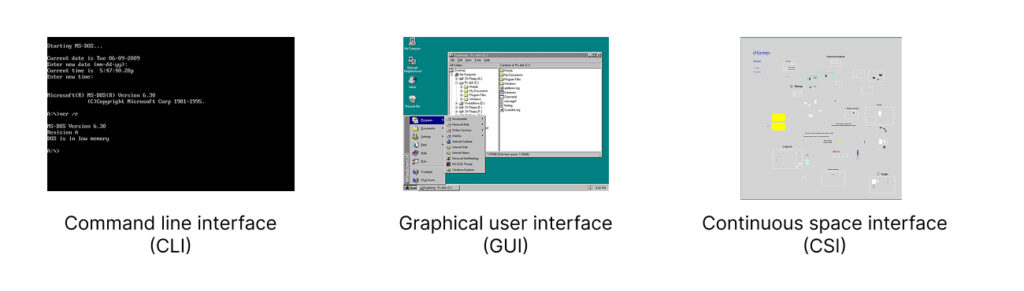
For a long time, there have been only two main ways to interact with a computer screen: command-line interface (CLI) and desktop-based graphical user interface (GUI). I came up with the third one. I call it continuous space Interface (CSI).

What is wrong with desktop-based interface?

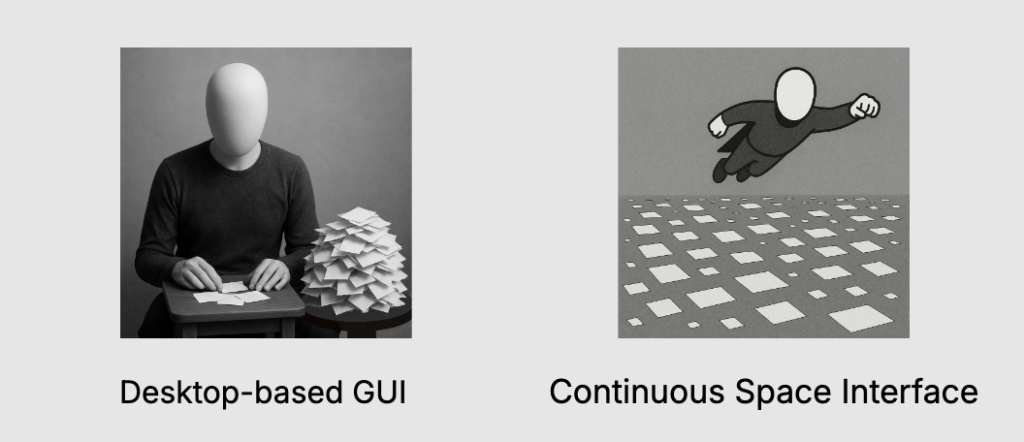
Have you ever noticed how awkward it is to navigate your computer? First of all, you don’t have enough space. The size of your screen determines how much working space you have.

Everything is crammed into sliding windows that constantly overlap. If you want to view one thing, you have to push something else out of the way. Or you stack windows on top of each other, creating a mess.

Because there is always not enough space, everything is dense. Whenever you need to make a choice, you always have to choose out of 100 items.

  • Need to open an app? Here is a list of your 100 apps.
  • Need to use a bookmark? Here are 100 bookmarks to choose from.
  • Need to find a note? There are countless notes, so you have to use search.

Windows are constantly shifting relative to each other, making it hard to orient yourself. Every time you need to switch contexts, you have to pause and think, How do I get there?

The only thing that remains somewhat stable is the folder hierarchy—which is a nightmare of its own. Humans didn’t evolve to navigate tree structures. It’s an unnatural, abstract way to organize information.

Also, why do we still have to name every file we save? In the real world, you don’t label every piece of paper you set on your desk.

Imposed hierarchies

Apps impose hierarchies that you may not want to use. For example, you may have a certain project in mind. There are things on your computer that belong to that project, like bookmarks, notes, files, etc. But where are they? They are all over the place.

  • Bookmarks live in your browser, buried among bookmarks from unrelated projects.
  • Notes are trapped in your note taking app.
  • Files are hidden somewhere in a folder maze.

Each time you need something, you’re forced to either sift through 100 options or rely on search.

How did we get here?

A lot of these design choices were made when computers were primitive by today’s standards.

  • Hierarchical directories? Invented before computers even had screens.
  • Desktop-based GUI? Developed in the ’70s, when it made sense given the limitations of the time.

Back then, these ideas were practical. Today, they’re just outdated traditions.

We now have computers powerful enough to render entire 3D worlds in real-time—yet we’re still clinging to outdated design principles like folder hierarchies. Instead of designing interfaces that work for us, we keep making things convenient for the computer.

The solution. Continuous space interface

You know what’s easy to navigate? The real world.

In the real world, you don’t shuffle through sliding windows—you place things in space. Related objects are positioned closer together. You don’t need search bars or hierarchical menus to find your stuff. You just know where things are because of spatial memory.

So why don’t computers work the same way?

They can. We already build immersive digital spaces in video games. Imagine an operating system designed like that. Instead of staring at a cluttered desktop, you’d enter a spatial environment—a 2D or 3D space where your data isn’t locked inside folders but arranged visually, like objects in a room.

No more sliding windows—just move through your workspace instead of rearranging it.

No more file names—just like objects in real life don’t need labels, your digital documents can be identified by their location in space.

No more rigid hierarchies—just arrange things in a way that makes sense to you.

You may think that such navigation will be too slow. But in reality it will be like playing a video game on a God mode. There will be all sorts of navigational tricks and shortcuts that will make you navigation super fast while keeping it continuous. You want to avoid ‘teleportations’ or instant changes in your environment that disorient you.

No imposed hierarchies

In a spatial interface, you control the organization.

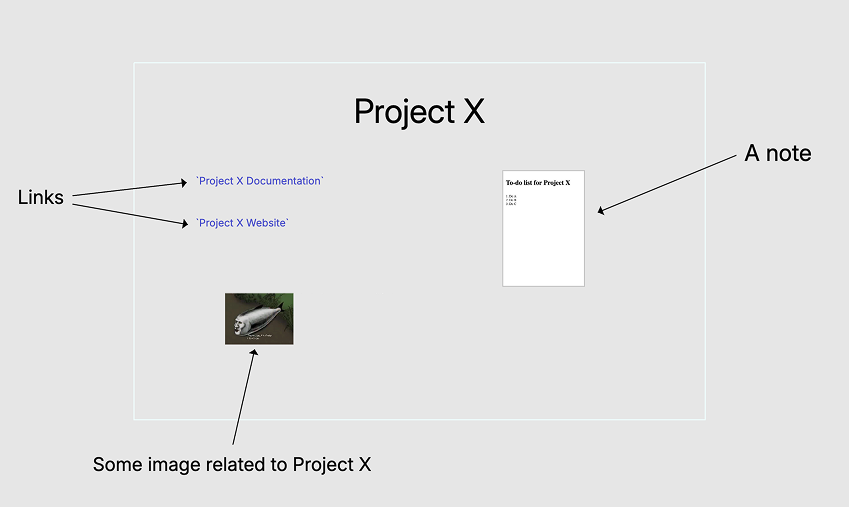
Say you’re working on a project. Instead of digging through separate apps, you could have everything—notes, bookmarks, images—right there in one space.

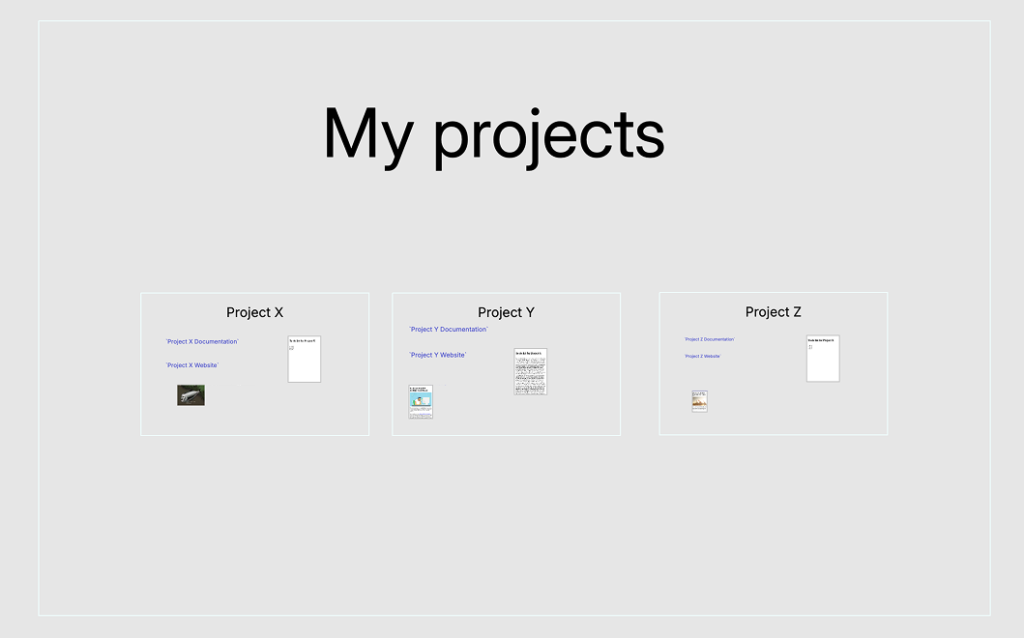
Imagine a simple rectangle representing your project. Inside, you place everything related to it. No more choosing between 100 options or relying on search. Instead, your choices are always visually and spatially obvious.

You can organize your projects the same way, by placing related projects closer together.

This may remind you of folder hierarchies. But this is a hierarchy that you create. Not something inconvenient that is imposed upon you.

Here is an example of a 3D interface:

How to implement Continuous Space Interface

We don’t need to build an entirely new operating system from scratch. Instead, we can start with an app. While a dedicated OS might be useful in the future, the best way forward is to test the concept in a more controlled way first.

We can also define a limited scope to begin with. The app could handle essential elements like:

  • Text documents
  • Images
  • Links
  • File shortcuts
  • Lines and arrows

More features can be added later. Do we need spreadsheets? Maybe—but it’s not necessary to include everything from the start.

LZ Desktop

I’ve already built an early version of this concept. I call it LZ Desktop (Large Zoomable Desktop). It’s far from finished, but I released it anyway—because it’s the first step toward building a new kind of web, which I discuss in other posts.

As I continue to improve the app, others can start creating content in new formats that currently only this app understands.

Here is a short video demonstrating some features of this app:

You can download the app here.

How I came up with this idea

I wouldn’t have realized there was something fundamentally wrong with computers if not for Ted Nelson. He started designing interfaces for computer screens before computers even had screens, imagining a world where computers would connect and interlink information seamlessly.

The way I understand his vision, connectivity was meant to be the core feature of computers. You should be able to link and combine pieces of content from different places—whether on your local system or across the network. Instead of isolated files and rigid structures, everything would flow together.

But his ideas didn’t prevail. Instead, computers and the web became highly containerized. Everything is locked inside a box—a file is a container, a web page is a container, an app is a container. The seamless connectivity Nelson envisioned was thrown away, all in the name of security and scalability.

I believe connectivity is too important to sacrifice. There are other ways to ensure security without isolating everything into silos. As for scalability, you don’t need to scale everything. The most common actions people take on computers—writing, linking, saving information—could be standardized, eliminating unnecessary variations in how different apps handle the same tasks. There’s no need for every application to reinvent how text is processed or how links are created.

Instead of forcing users to navigate a maze of folders and incompatible tools, we could create an environment where these fundamental actions work seamlessly across the system. For more specialized cases, containers can still be used, but they shouldn’t be the default for everything. 

Post scriptum (written in August 2026)

This article was originally published on March 3, 2025 on my site reinventingtheweb.com which was later renamed to readersweb.org. I came up with my ideas about Reader’s Web while working on my app. Initially I thought that my app LZ Desktop was important for the success of the new Web. Over time I figured out how to move the web project to the browser by utilizing browser extensions and server plugins. So, this article became kind of off-topic on the original site, and that’s why I moved it here.

I think the idea of Continuous Space Interface is still valid. I just don’t see it as important for my other project which I now call Reader’s Web.

I actually discussed my CSI ideas once on Reddit. You can find the discussions here. I wasn’t able to convince anybody though. Because the redditors I talked to didn’t see nuances, the general sentiment was that “this has been tried before”. I totally disagree. When I have time, I’ll write about it in another article.

About cryonics

This page contains floating links. To view them install Visible Connections extension and reload the page.

For a long time, I thought cryonics was some kind of scam. That’s because I assumed they just froze you, and since ice takes up more space than the water that formed it, all your cells would get destroyed.

It turns out they use something called vitrification. Basically, they replace your blood with a liquid that doesn’t behave like water when it freezes.

There have even been experiments where researchers vitrified a rabbit kidney, then rewarmed it and transplanted it back into the rabbit. They have also vitrified rabbit brains and some parts of the human body.

The problem with cryonics is that if you wanted to put a person into a kind of cryo-sleep, you would have to cool each organ at different rates and use different cryoprotectants for each one.

But at least they don’t just freeze you destroying all the cells in your body.